How to Recover Deleted WhatsApp Messages on Android and iPhone
Losing a WhatsApp conversation is one of those moments that hits harder than it should. An important address, a professional exchange, a file someone sent you once - gone. The good news is that recovery is sometimes possible. The bad news is that it almost always depends on whether a backup exists, and when it was last made.
This guide covers what actually works, why most "magic recovery" tricks don't, and how to make sure you never end up in this situation again.
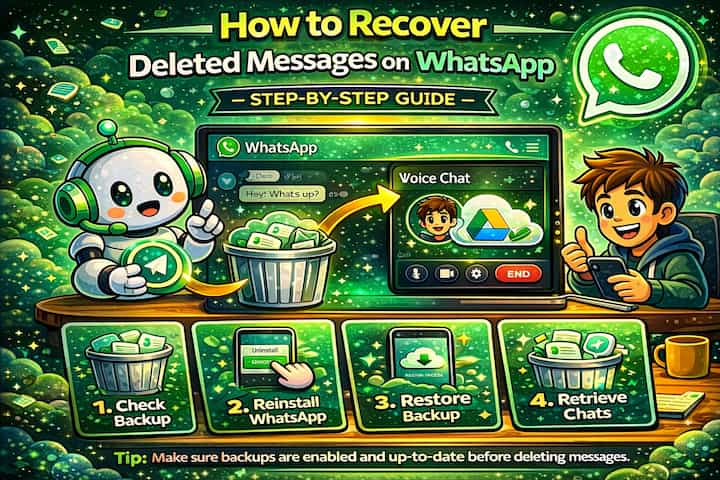
Quick Answer (For Those in a Hurry)
If you have a recent backup on Google Drive (Android) or iCloud (iPhone), you can recover deleted messages by uninstalling WhatsApp, reinstalling it, and choosing Restore when prompted. The process restores your chats to the state they were in at the time of the backup - anything deleted before that backup was made can come back, anything deleted after is likely gone for good.
What This Guide Actually Helps You Do
This guide is designed for readers who want to recover or move important conversations only when the app gives you a reliable path to do it. It adds value beyond the basic menu path by explaining whether the backup or transfer method matches your phone number, cloud account, device type, and timing. That matters because people often reinstall the app or reset a phone before checking whether the backup is recent enough and linked to the right account.
The practical goal is to leave you with a result you can verify, not just a menu path you followed. It also keeps the limits visible: this guide does not pretend to offer recovering encrypted messages that were never backed up or accessing someone else's private data. It shows the reliable path, the trade-offs, and the checks that help you avoid repeating the same mistake.
Real Situations Where This Actually Matters
This isn't an abstract problem - there are a few specific scenarios where people find themselves frantically searching for a way to get messages back.
You deleted a conversation by accident. It happens more than people admit. A long-press on the wrong chat, a confirmation tap you didn't mean to make, and suddenly an entire thread is gone. If that thread contained a delivery address, a contract detail, or even just sentimental value, the urgency is real.
Someone sent you a file or piece of information you didn't save. A colleague shared login credentials over WhatsApp, or a client sent you a document you meant to forward elsewhere but never did. You didn't think you'd need to recover it - until you did. This is exactly the situation where backup recovery earns its place.
WhatsApp was reinstalled or the phone was reset without thinking ahead. A factory reset, a phone upgrade, or a troubleshooting step that went wrong - and suddenly the app is fresh with no history. People often don't realize their messages weren't backed up until it's too late. Knowing the recovery process in advance can save a lot of stress.
Before You Try Anything: One Thing to Know
Recovering deleted WhatsApp messages always means restoring a backup - not retrieving individual messages. When you restore, you go back to the exact state your chats were in at the time of that backup. Any messages received or sent after that point will not be in the restored version.
This is the most important thing to understand before you start. The process isn't surgical - it's a full rollback. If your last backup was three days ago and you deleted the message yesterday, you'll get it back. If your backup was made after the deletion, it's already gone from that snapshot too.
How to Recover Deleted WhatsApp Messages - Step by Step
Step 1 - Check Whether a Backup Exists
Before uninstalling anything, confirm that a backup actually exists and note its date. On Android, go to WhatsApp -> Settings -> Chats -> Chat Backup and look for the date and time of the last backup, along with the Google account it's linked to. On iPhone, go to WhatsApp -> Settings -> Chats -> Chat Backup and check the iCloud backup date.
If the backup predates the deletion - you're in good shape. If the backup was made after the deletion, or if no backup exists at all, the chances of recovery drop significantly.
Step 2 - Uninstall WhatsApp
Once you've confirmed a usable backup exists, uninstall WhatsApp from your device. On Android, long-press the app icon and select Uninstall. On iPhone, long-press and tap Remove App.
Step 3 - Reinstall WhatsApp
Download and reinstall WhatsApp from the Google Play Store or the App Store. Use the official app only.
Step 4 - Verify Your Phone Number
Open WhatsApp and go through the standard verification process using the same phone number that was linked to your account and backup. Using a different number will not give you access to the previous backup.
Step 5 - Restore the Backup
When WhatsApp detects an available backup, it will prompt you to restore. Tap Restore and wait for the process to complete. Depending on the size of your backup and your connection speed, this can take anywhere from a few seconds to several minutes. Media files (photos, videos) typically restore after the messages themselves.
That's it. Once the restoration is complete, your chats will reappear as they were at the time of the backup.
What Changes After You Restore
Once the restoration is complete, your chat history will reflect the state of your backup. Messages that existed at that point will be back. Any conversations or messages you received or sent between the backup date and now will not appear - they weren't part of that snapshot. This is the trade-off, and it's worth knowing before you commit to the process.
Your media files - photos, voice notes, videos - will also be restored, though they may take longer to fully reload depending on the size of the backup and your internet connection.
Advanced Tips: When the Standard Process Doesn't Work
The basic restore covers most situations, but there are a few less obvious techniques worth knowing for edge cases.
Restore a local backup on Android if Google Drive isn't available. WhatsApp stores local backup files on your device in a folder called Databases. These files are named with dates, which means you may have access to a snapshot from before the deletion even if Drive sync wasn't active. Using a file manager, navigate to the WhatsApp Databases folder, make a copy of the dated file you want to restore, rename it to match the filename WhatsApp expects as its default backup, then reinstall the app. WhatsApp should detect and offer to restore it.
Use the same Google or Apple account consistently. One of the most common reasons backups aren't detected is a mismatch between the account used during backup and the one currently active on the device. Before reinstalling, double-check that you're signed into the exact same Google account (Android) or Apple ID (iPhone) that was used when the backup was created.
Check if the content exists elsewhere before going through a full restore. Before committing to a rollback, ask yourself whether the information you need might already exist in another form - a screenshot someone took, a forwarded message, a file saved to your phone's gallery, or an export you made at some point. A full restore has consequences (you lose recent messages), so it's worth exhausting simpler options first.
Ask the other person to resend it. It sounds obvious, but it's often the fastest solution. If the message contained something the other person can simply send again - a document, an address, a piece of information - just ask. No backup manipulation needed, no risk of losing recent messages.
Why Recovery Isn't Always Possible
It's worth being direct about the limits here. WhatsApp's encryption means that messages aren't stored on any server you can access - they live on your device and in your personal backup. If no backup was made before the deletion, there is genuinely no reliable way to get those messages back. Apps that claim to recover WhatsApp messages "without a backup" are almost universally misleading - they can't reconstruct data that was never saved, and many of them request invasive permissions that create real privacy risks.
Even with a backup, the timing matters. A daily backup made at 2am won't help you recover a message that was deleted at 10am, because the most recent backup already reflects the deletion. And restoring an older backup means giving up everything that happened between that backup and now.
Frequently Asked Questions
If I restore a backup, will I lose my recent messages? Yes, potentially. Restoring takes you back to the state of the backup you choose. Any messages sent or received after that backup was made will not be present in the restored version. This is why it's worth checking the backup date carefully before committing - and why some people choose to export or screenshot recent important conversations before proceeding.
Why isn't WhatsApp detecting my backup during reinstallation? The most common reasons are a mismatch between phone numbers (you must use the same number), a mismatch between accounts (wrong Google account or Apple ID), insufficient storage space, a lost internet connection during the detection process, or a corrupted backup file. Going through each of these systematically usually identifies the issue.
Can I recover a specific deleted message without restoring everything? No - there's no built-in way to recover individual messages selectively. WhatsApp's restore process is all-or-nothing: you get the full state of the backup, not individual items from it. Third-party tools claim to offer this, but they are unreliable at best and risky at worst.
Does restoring a backup affect my WhatsApp on other devices? If you use WhatsApp on multiple devices (through the linked devices feature), the restoration affects your primary device only. Linked devices sync from the primary, so they may reflect the restored state once reconnected, but the exact behavior can vary. It's worth unlinking secondary devices before restoring if you're concerned about sync conflicts.
How far back can I restore? Is there a limit on backup history? On Google Drive, WhatsApp typically keeps one backup at a time - meaning the most recent one overwrites the previous. Some Android devices also keep local backups for up to seven days. On iCloud, the same logic applies: generally one stored backup at a time. This is why acting quickly after an accidental deletion matters - the sooner you try to restore, the more likely the backup predates the deletion.
What To Verify Before You Finish
A good finish looks like this: you know exactly which backup or transfer source will be used and what newer messages could be missing afterward. Before moving on, do a small real-world test: check the backup date, account name, phone number, available storage, and internet connection before uninstalling or moving anything.
If the restore prompt does not appear or the transferred history is incomplete, the most likely explanation is that the phone number, Google account, Apple ID, device pair, storage permission, or backup location does not match the original setup. In that case, use the troubleshooting or limitation section above first, because repeating the same taps usually hides the real cause.
Related Guides
Read next: Schedule messages on WhatsApp | Send disappearing messages on WhatsApp | Delete WhatsApp messages for everyone
Final Thoughts
Recovering deleted WhatsApp messages is genuinely possible - but only when the conditions are right. The single most important factor is whether a backup exists that predates the deletion. Everything else is secondary. If you've been through this stressful experience once, it's worth spending five minutes setting up automatic daily backups so you never have to go through it again.