How to Hide Your Online Status on WhatsApp (And Why It Actually Matters)
If you've ever opened WhatsApp and immediately felt the pressure of someone seeing you online - you're not alone. That little "online" label under your name is small, but it carries weight. It sets expectations, invites follow-up messages, and can make a casual scroll through your phone feel like a commitment.
The good news? WhatsApp lets you turn that off. Here's exactly how to do it, and what you should know before you change anything.
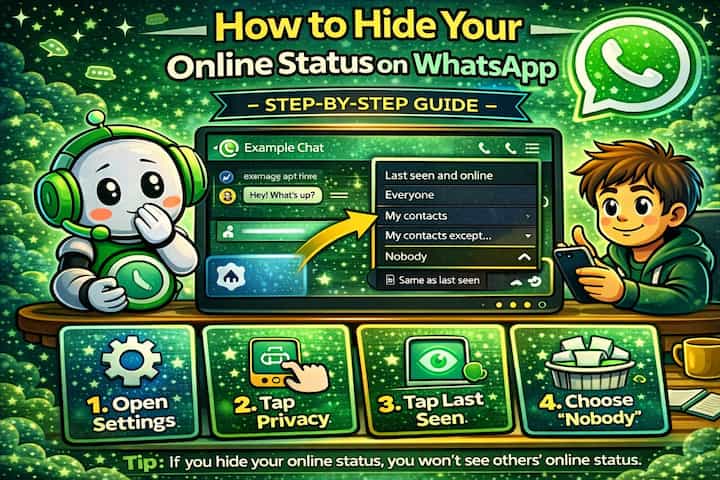
Quick Answer (For Those in a Hurry)
Go to Settings -> Privacy, tap Last Seen and Online, set Last Seen to Nobody, then set Online to Same as Last Seen. That's it - your online status is now hidden from everyone. But before you do that, there are a few important things worth understanding.
What This Guide Actually Helps You Do
This guide is designed for readers who want to change privacy or safety settings without misunderstanding what other people can still see. It adds value beyond the basic menu path by explaining which signals are hidden, which ones remain visible, and whether the change affects one conversation, one contact, or the whole account. That matters because privacy features are easy to overestimate, especially when screenshots, notifications, profile visibility, or group behavior still reveal context.
The practical goal is to leave you with a result you can verify, not just a menu path you followed. It also keeps the limits visible: this guide does not pretend to offer total invisibility, message secrecy against screenshots, or a way to bypass another person's privacy settings. It shows the reliable path, the trade-offs, and the checks that help you avoid repeating the same mistake.
What "Online" Actually Means on WhatsApp
When WhatsApp shows you as "online," it means you currently have the app open and active on your screen. It's not the same as Last Seen, which just records the last time you opened the app.
Both are connected in WhatsApp's privacy system - and that link matters more than most people realize. Hiding one affects the other, and understanding why will save you from a lot of confusion later.
Real Situations Where This Actually Helps
This isn't just a technical setting - it changes the way you experience the app day to day. Here are three situations most people have run into at some point.
You need to avoid someone for a while. Maybe it's a conflict, an awkward situation, or someone who messages relentlessly the moment they see you active. Hiding your online status means you can open WhatsApp, check other conversations, and not trigger that person into messaging you immediately.
Your boss or a client is on WhatsApp. This is one of the most common reasons people look this up. You're on your personal phone on a Saturday evening, catching up with friends - but your manager can see you're online and wonders why you haven't replied to their 6pm message. Hiding your status creates a clean boundary without having to explain yourself or turn off WhatsApp entirely.
You want to read at your own pace without creating pressure. Sometimes you get a message that needs a thoughtful reply - not a rushed one. Being visibly online creates an unspoken expectation to respond immediately. Hiding your status gives you space to read, think, and reply when you're actually ready.
Before You Change Anything: One Thing to Know
WhatsApp's privacy settings are mutual. If you hide your online status and Last Seen from others, you also lose the ability to see theirs.
This catches a lot of people off guard. It's not a bug - it's how WhatsApp designed the system to stay balanced. So think about whether that trade-off works for you before making the switch.
How to Hide Your Online Status - Step by Step
Step 1 - Open Settings
Open WhatsApp and tap the three dots in the top-right corner on Android, or go to Settings via the bottom tab on iPhone.
Step 2 - Go to Privacy
Navigate to Settings -> Privacy.
Step 3 - Open Last Seen and Online
Tap Last Seen and Online. This single section controls both visibility settings.
Step 4 - Set Last Seen to Nobody
Under Who can see my Last Seen, select Nobody.
Important: This step is required. You cannot hide your online status without restricting Last Seen first - the two settings are linked.
Step 5 - Hide Your Online Status
Under Who can see when I'm online, select Same as Last Seen.
Since Last Seen is now set to Nobody, this effectively hides your online status from everyone.
That's it. No confirmation screen, no waiting - the change is instant.
What Changes After You Do This
Once these settings are active, people who message you won't see "online" when you have the app open. Your Last Seen timestamp will also disappear - from their side, it simply shows that the information isn't available. And no, they won't get a notification that you changed anything.
On your end, the same applies in reverse - you won't be able to see when your contacts were last online either.
Advanced Tips: Go Further Than the Settings Menu
The built-in settings cover most cases, but there are a few extra techniques worth knowing if you want more control.
Read messages without opening WhatsApp. On both Android and iPhone, message previews appear in your notification bar. You can read the content of a message without ever opening the app - which means no "online" status, no Last Seen update, and no blue ticks. It's not ideal for long messages, but it works perfectly for quick checks.
Use Airplane Mode to read without triggering anything. Enable Airplane Mode before opening WhatsApp, read the message, then close the app completely before turning Airplane Mode off. Done correctly, the message won't register as read and your online status won't appear. It's a manual workaround, but some people swear by it for sensitive conversations.
Combine hidden status with disabled Read Receipts. These are two separate settings, but they work well together. Hiding your online status removes visibility of when you're active. Disabling Read Receipts (Settings -> Privacy -> Read Receipts) removes visibility of whether you've read a message. Together, they give you a much quieter, less trackable presence on the app.
Hide from specific people without going fully invisible. If you don't want to hide from everyone, use the "My Contacts Except..." option under Last Seen. This lets you exclude specific contacts - your boss, an ex, anyone really - while staying visible to everyone else. Set your online status to "Same as Last Seen" and those excluded people will see nothing.
Why Hiding Status Doesn't Make You Completely Invisible
It's worth being realistic about what these settings actually do. If you reply to someone thirty seconds after they messaged you, they'll know you were on your phone - hidden status or not. Message delivery ticks still exist: one grey tick means the message was sent, two grey ticks mean it was delivered to your device. Only the blue ticks (which confirm you opened it) can be disabled separately.
Group chats are also a different dynamic. Members can sometimes infer activity based on who's responded and when, even without seeing a direct online indicator.
These tools reduce your visibility significantly - they don't erase it entirely.
Frequently Asked Questions
Why can someone still see me as online even after I changed the settings? The most common reason is that the settings weren't saved properly, or that the app needs to be restarted to apply the changes. Also double-check that both Last Seen and Online Status are set correctly - changing only one of the two won't be enough.
Does hiding my online status affect the blue ticks?
No - these are two completely separate settings. Blue ticks (read receipts) are controlled under Settings -> Privacy -> Read Receipts. Hiding your online status has no impact on them. If you want to disable both, you need to change each setting individually.
Can I hide my online status from just one person? Not directly through the online status toggle - but yes, indirectly. Set your Last Seen to "My Contacts Except..." and add that person to the exclusion list. Then set your online status to "Same as Last Seen." That specific contact won't see your Last Seen or online status, while everyone else still can.
If I hide my status, will the person I'm avoiding know I'm ignoring them? They won't see you as online, so they won't know when you've read their message (if Read Receipts are also off). What they will notice is that your Last Seen and online status are simply not visible - but that's true of any contact who has privacy settings enabled. There's nothing that signals you've specifically hidden it from them.
Does this work the same on iPhone and Android? Yes, the feature and settings are identical on both platforms. The navigation looks slightly different - iPhone uses a tab bar at the bottom, Android uses a three-dot menu - but the options are the same.
What To Verify Before You Finish
A good finish looks like this: the privacy behavior is clear in a real conversation and you know what the other person will still be able to notice. Before moving on, do a small real-world test: try the setting with a trusted contact or secondary device, then compare the visible profile, notification, or message state from both sides.
If someone can still see something you expected to hide, the most likely explanation is that the feature protects only a specific layer of privacy and does not control screenshots, saved media, group history, forwarded content, or old notifications. In that case, use the troubleshooting or limitation section above first, because repeating the same taps usually hides the real cause.
Related Guides
Read next: Hide WhatsApp chats without deleting them | Recover deleted messages on WhatsApp | Lock WhatsApp with fingerprint
Final Thoughts
Taking control of something as small as your online status can genuinely change how you feel about using the app. It shifts the experience from reactive - always visible, always expected to respond - to something more on your own terms. For most people, that's worth the two minutes it takes to set up.