How to Edit Sent Messages on Telegram (And What the "Edited" Label Actually Shows)
Telegram lets you edit messages after sending them, with no deletion and no awkward "I meant to say..." follow-up. The edit replaces the message in place, it stays in the same position in the conversation, and a small "edited" label appears so recipients know it was changed. The 48-hour window is generous for most situations, and editing works across private chats, groups, and channels. The one thing worth understanding before you start is exactly what that "edited" label exposes - and what it doesn't.
Quick Answer (For Those in a Hurry)
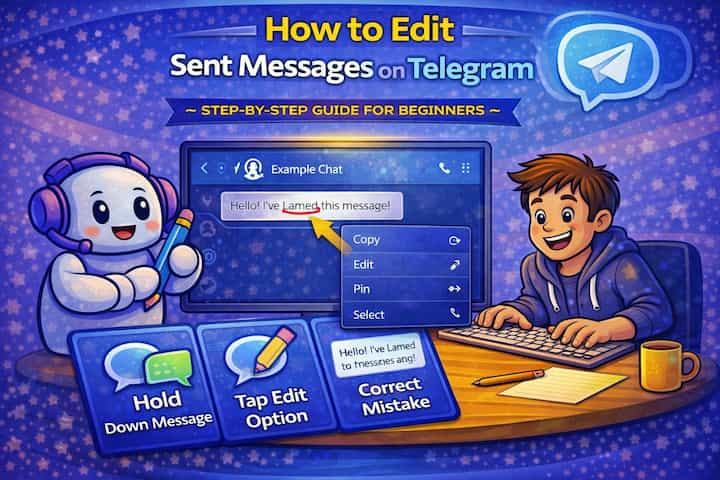
On mobile, long-press the message you want to edit and tap Edit from the menu. On desktop, right-click the message and select Edit. The message text becomes editable in place - make your changes and tap the checkmark or press Enter to save. The updated message appears with a small "edited" label underneath it. You have 48 hours from the original send time to edit.
What This Guide Actually Helps You Do
This guide is designed for readers who want to control message timing, visibility, editing, or notifications with fewer surprises. It adds value beyond the basic menu path by explaining whether the feature changes the message itself, the delivery timing, the visible history, or only your local notification experience. That matters because users often assume message tools work the same in private chats, groups, linked devices, and desktop apps, but the details can differ.
The practical goal is to leave you with a result you can verify, not just a menu path you followed. It also keeps the limits visible: this guide does not pretend to offer silent changes that nobody can notice, guaranteed delivery in every case, or automation that ignores app limits. It shows the reliable path, the trade-offs, and the checks that help you avoid repeating the same mistake.
Real Situations Where Editing Messages Actually Matters
The ability to edit rather than delete and resend keeps conversations cleaner and avoids the social awkwardness of visible corrections.
You sent a message with a factual error - a wrong date, an incorrect number, a broken link - in an active group or channel. In groups with many members, deleting and resending creates a notification event and visual disruption. Editing replaces the content in place without any of that - the corrected information appears where the wrong information was, and members who didn't see the original message only ever see the correct version. For channel admins, this is how you fix errors in announcements without creating a correction post.
You composed a message quickly and sent it with a typo or unclear phrasing, and the recipient clearly misunderstood. The conventional response is a follow-up message clarifying what you meant, which adds length to the conversation. Editing the original removes the ambiguity at its source and keeps the thread readable for anyone who sees it later. In professional or high-context conversations, a clean original message is preferable to an original plus a clarification.
You sent a message that contained information that's changed since you sent it - an event that moved, a plan that was updated, a file that was replaced. In an ongoing group where people scroll back to reference information, an outdated message sitting in the history is worse than a corrected one. Editing the original to reflect the updated information ensures anyone who later looks back at the message gets accurate information, not a stale version.
Before You Edit: One Thing to Know
When you edit a message on Telegram, recipients can see that it was edited - the "edited" label appears on the message - but they cannot see what the original message said. Telegram does not show an edit history to other users. They see the current version with an "edited" indicator, not a comparison between the old and new text. This is different from some other platforms where edit histories are visible. For most situations, this is straightforward - but if you're editing a message to walk back something you said, be aware that the fact of an edit is visible, even if the original content isn't.
How to Edit a Sent Message on Telegram - Step by Step
Step 1 - Open the Chat and Find the Message
Navigate to the conversation containing the message you want to edit. Scroll to it if needed - there's no restriction on how far back in a conversation you can edit (within the 48-hour window).
Step 2 - Long-Press (Mobile) or Right-Click (Desktop)
On mobile, press and hold the message for about one second until a menu appears. On desktop, right-click the message to open the context menu. On both platforms, the menu appears in the same position as the message.

Step 3 - Tap or Click "Edit"
Select Edit from the menu. The message text loads into the input field at the bottom of the screen (mobile) or becomes an inline editable field (desktop). A pencil icon or edit indicator confirms the edit mode is active.
Step 4 - Make Your Changes
Edit the text as needed. You can change any part of the message - fix a typo, rewrite a sentence, update information, add content, or remove content. For messages with captions (photos, files, videos), you can edit the caption text but not the attached media file itself.
Step 5 - Save the Edit
Tap the checkmark button (mobile) or press Enter (desktop) to save. The edited message replaces the original in the conversation instantly.
Step 6 - Confirm the "Edited" Label Appears
After saving, a small "edited" label appears below the message content. This is visible to all participants and confirms the change was made. The label is permanent and cannot be removed.
What Changes After an Edit
The edited message occupies the same position in the conversation timeline as the original - it doesn't move to the bottom like a new message would. For recipients who read the original before you edited it, they saw the old version. Anyone reading the conversation after the edit, including new group members checking history, sees only the current edited version with the "edited" indicator.
Read receipts and message delivery status (the checkmarks that show whether a message was delivered or read) are unaffected by edits. If someone read your message before you edited it, the blue checkmarks don't change after the edit. The edit doesn't trigger new notifications - people who have already dismissed the message notification won't be pinged again when you edit. This is an important design detail: if you edit a message to include important new information, people who already received and dismissed the notification won't necessarily know the message changed.
In channels, edits propagate to all subscribers immediately. Anyone who has the channel open when you edit will see the message update in real time. Subscribers who aren't currently viewing the channel see the updated version next time they open it.
Advanced Tips: Using Message Editing More Effectively
Edit quickly when correctness matters more than the recipient noticing the edit. In time-sensitive contexts - a meeting link that changed, an incorrect time, a typo that changes meaning - edit immediately rather than sending a correction message. Most people won't notice the "edited" label, and the corrected information reaches anyone who reads the message later. A correction follow-up message draws more attention to the mistake than quietly fixing it.
Use editing to add important information to a message rather than sending a follow-up in busy chats. In active group chats, multiple-message context chains (where you add context as follow-up messages to your own) create visual noise. If you realize immediately after sending that you forgot something important, editing the original to include it keeps the information bundled together and avoids the scattered appearance of back-to-back self-replies.
For channel posts, edit the pinned version or a recent announcement rather than posting a new correction announcement. If you pin an announcement and later notice an error, edit the original pinned message rather than posting "correction: the event is on Thursday, not Wednesday." The pinned message is what people reference, and editing it updates the canonical information. A correction post creates two pieces of information about the same event, which confuses people who encounter both.
On desktop, use the up arrow key to quickly edit your last sent message. In the Telegram Desktop app, pressing the up arrow key immediately after sending a message opens it for editing - no right-click required. This is a keyboard shortcut that most desktop users don't know about, and it's the fastest way to fix a typo the moment you notice it.
What Editing Can't Do
The 48-hour window is absolute - after that point, the edit option disappears entirely and there's no way to modify the message content. If you need to correct something after 48 hours, deleting and resending (if the original message can be deleted) or posting a follow-up correction is the only option.
Editing also can't change the type of content in a message. You can edit the text caption on a photo, but you can't replace the photo itself with a different one. You can fix the text in a text message, but you can't add an attachment to a message that originally had none. If the content type needs to change, a new message is required.
The "edited" label cannot be removed and doesn't include a timestamp of when the edit was made (visible to other users) or the previous content. While recipients can't see what you changed from, the presence of the label is permanent. In situations where you're editing to remove sensitive content, the "edited" indicator will always signal that something changed, which may itself draw attention.
Secret Chats have stricter edit limitations. While editing is available in Secret Chats, the behavior may differ and depends on whether the other person's app version supports the edit. In some Secret Chat configurations, edits aren't propagated the same way they are in regular chats.
Frequently Asked Questions
If I edit a message, do people who already read it get notified of the change? No. Editing a message does not generate a new notification. People who read the original message and dismissed the notification won't be re-notified that the message was edited. They'll see the "edited" label and the new content the next time they look at that part of the conversation, but there's no push notification for edits. This is why editing isn't always sufficient for critical updates - important changes may need a new message to ensure they're seen.
Can I see the edit history of my own messages or others' messages? No. Telegram doesn't provide an edit history view to any user - neither the sender nor the recipients. You can only see the current version of the message with the "edited" indicator. The previous content is not recoverable through Telegram's interface once an edit is saved. Some third-party bots can be set up to log edits in specific channels or groups, but this is an opt-in tool managed by group/channel admins, not a native Telegram feature.
If I edit a message in a group, does the edit apply everywhere, including on other people's devices? Yes. The edit propagates to all devices where that chat is accessible in real time. When you save an edit, the message updates simultaneously on your own device and on every other participant's device. There's no partial edit state where some people see the old version and others see the new one - the edit is server-side and applies universally.
Does editing a message affect whether it appears in search results within Telegram? Yes. Telegram's in-app search indexes the current content of messages. If you edit a message to change a keyword, searches for the old keyword won't find that message, while searches for the new keyword will. This means you can effectively make a message "unsearchable" by its original terms by editing the relevant content - useful to know both for managing your own messages and for understanding the limits of searching past conversations.
Why can I edit some messages but not others in the same chat? The most likely reason is the 48-hour time limit. Messages older than 48 hours can't be edited - the option simply doesn't appear in the context menu for those messages. If the time limit isn't the issue, check whether the message type supports editing (voice messages and certain media types have restrictions), whether you're the original sender (you can only edit your own messages), and whether the chat has any admin restrictions that limit message management.
What To Verify Before You Finish
A good finish looks like this: the message or notification behaves as expected in the exact chat type where you plan to use it. Before moving on, do a small real-world test: run a harmless test message or notification change in the same type of chat before using it for something important.
If the timing, edit, pin, or notification does not behave as expected, the most likely explanation is that the chat type, device state, recipient settings, app version, or notification permissions are changing how the feature works. In that case, use the troubleshooting or limitation section above first, because repeating the same taps usually hides the real cause.
Related Guides
Read next: Send disappearing messages on Telegram | Pin messages on Telegram | Schedule messages on Telegram
Final Thoughts
Editing in Telegram is genuinely clean - the message stays in place, the conversation doesn't fragment, and the "edited" label is honest without being intrusive. The keyboard shortcut on desktop (up arrow to edit last message) is worth building as a reflex. For anything time-sensitive, edit immediately rather than sending a correction follow-up - it results in a cleaner conversation for everyone reading it later.