How to Block Someone on WhatsApp (And What Actually Happens When You Do)
There's a point in every unwanted conversation where you stop thinking about how to reply and start thinking about how to make it stop. Whether it's a stranger who won't quit, an ex who keeps reaching out, or a number sending you spam at 2am - WhatsApp's block feature exists exactly for that moment. It's immediate, it's discreet, and the other person never gets a notification that it happened.
Here's how to do it, what changes on both ends, and what blocking actually can't protect you from.
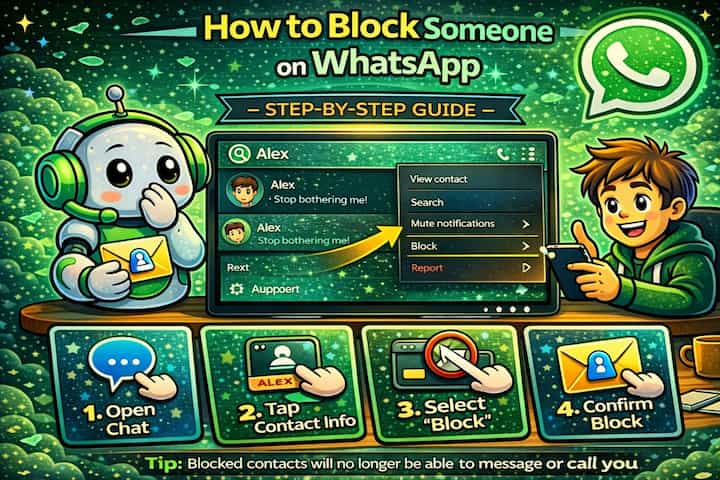
Quick Answer (For Those in a Hurry)
Open the chat with the person you want to block, tap their name at the top to open their profile, scroll down and tap Block, then confirm. The block takes effect immediately - they can no longer message you, call you, or see your activity on WhatsApp.
What This Guide Actually Helps You Do
This guide is designed for readers who want to change privacy or safety settings without misunderstanding what other people can still see. It adds value beyond the basic menu path by explaining which signals are hidden, which ones remain visible, and whether the change affects one conversation, one contact, or the whole account. That matters because privacy features are easy to overestimate, especially when screenshots, notifications, profile visibility, or group behavior still reveal context.
The practical goal is to leave you with a result you can verify, not just a menu path you followed. It also keeps the limits visible: this guide does not pretend to offer total invisibility, message secrecy against screenshots, or a way to bypass another person's privacy settings. It shows the reliable path, the trade-offs, and the checks that help you avoid repeating the same mistake.
Real Situations Where Blocking Is the Right Call
Blocking isn't dramatic - it's a practical tool, and most people who use it have a very specific reason.
You're getting messages from a number you don't recognize and don't want to engage with. Spam, scam attempts, promotional messages from businesses you never contacted - WhatsApp has become a channel for all of it. Replying, even to say "stop," often makes it worse. Blocking immediately cuts off that number's ability to reach you, without any response required on your part.
Someone from your past keeps initiating contact despite clear signals you're not interested. This is one of the most common reasons people look up how to block on WhatsApp. An ex, a former colleague, someone from a situation you've moved on from - blocking removes the question entirely. They won't see when you're online, they won't know if their messages are being received, and you won't have to keep deciding whether to reply.
You need to separate yourself from someone in a professional context that's become uncomfortable. Not every difficult situation involves a stranger. Sometimes it's a client who communicates aggressively, a former business partner who won't accept that a project is over, or a coworker you've had a falling out with. Blocking on WhatsApp doesn't affect email or other channels - it just removes one avenue of contact while you figure out how to handle the broader situation.
Before You Block: One Thing to Know
Blocking someone on WhatsApp does not remove them from shared group chats. If you and the person you're blocking are both members of the same group, they can still see your messages there, and you'll still see theirs. Blocking only affects direct, one-on-one communication.
This surprises a lot of people. If a shared group is part of the problem, blocking alone won't solve it - you'll need to either leave the group or address the situation separately.
How to Block Someone on WhatsApp - Step by Step
Step 1 - Open WhatsApp and Find the Chat
Open WhatsApp and navigate to the conversation with the person you want to block.
Step 2 - Open the Conversation
Tap on the chat to open it.
Step 3 - Access the Contact's Profile
Tap the contact's name at the top of the screen to open their profile page.
Step 4 - Block the Contact
Scroll down to the bottom of the profile page and tap Block. WhatsApp will ask you to confirm - tap Block again to finalize.
The block is instant. No notification is sent to the other person.
What Changes After You Block Someone
From your side, the conversation stays in your chat list unless you delete it - blocking doesn't automatically remove the thread. You won't receive any new messages, calls, or status updates from that person. If they try to message you, those messages simply won't be delivered to your device. You won't see them at all.
From their side, the changes are subtle but noticeable if they're paying attention. Messages they send will show only one grey tick - sent, but never delivered. Your profile photo will stop updating, your Last Seen will disappear, and your online status will no longer be visible to them. WhatsApp doesn't tell them they've been blocked, but the combination of these signals often makes it fairly obvious.
Your previous conversation history remains intact on both sides unless one of you manually deletes it.
Advanced Tips: Getting More Out of the Block Feature
Blocking is straightforward, but there are a few things worth knowing that most guides don't mention.
Block directly from an unknown number's message without opening the chat. When you receive a message from a number not in your contacts, WhatsApp displays a prompt at the bottom of that conversation with options to Block and Report. You don't need to go into settings or open the contact profile - you can act immediately from the message itself. This is the fastest way to handle spam or unsolicited contact.
Report and block at the same time for spam or harassment. When you tap Block from the contact profile, WhatsApp gives you the option to also Report the contact. Reporting sends the last five messages from that conversation to WhatsApp for review without notifying the sender. If the contact is genuinely abusive or sending spam, doing both at once is worth the extra tap.
Manage your full block list from Privacy settings. If you want to review everyone you've blocked, unblock someone, or block a contact you don't have an active chat with, go to Settings -> Privacy -> Blocked Contacts. This is also where you can block someone proactively - without needing to find an existing conversation first.
Delete the conversation after blocking if you don't want the history. Blocking stops future contact, but the existing chat remains visible to you. If seeing that conversation in your list is a problem - for emotional reasons or simply for cleanliness - you can long-press the chat and delete it separately. The two actions are independent: you can block without deleting, delete without blocking, or do both.
What Blocking Can't Do
It's worth being clear about the limits. Blocking on WhatsApp is account-level and device-level - it doesn't stop someone from contacting you through other apps, by phone, by email, or in person. If you're dealing with a situation that goes beyond unwanted messages, WhatsApp's block feature is one small piece of a larger picture.
Within WhatsApp itself, a blocked contact can still interact with you indirectly through group chats you share. They'll see anything you post in those groups, and you'll see their messages too. If that's a concern, leaving the group is the only way to fully remove that contact point.
There's also no way to block someone silently from a shared group without them potentially noticing the change in your direct messaging behavior. And if the person creates a new number or a new account, they can attempt to contact you again - blocking doesn't prevent that, it just means you'd need to block the new number separately.
Frequently Asked Questions
If I block someone, can they still see messages I sent before blocking them? Yes. Blocking doesn't delete any previous messages on their device. Everything you sent before the block remains in their chat history exactly as it was. If you want those messages gone on your end, you'll need to delete the conversation manually - but you have no control over what's on their device.
Can a blocked contact tell they've been blocked, even without a notification? WhatsApp doesn't send any notification, but the signs are fairly transparent to anyone paying attention. Permanent single grey ticks, a profile photo that never changes, no Last Seen, no online status - these together are a strong indication. There's no way to block someone in a way that's completely undetectable if they're looking for those signals.
Does blocking someone also remove them from a group we're both in? No - group membership is separate from direct contact blocking. A blocked contact remains in any shared groups and can still see and reply to your messages there. If you want to fully cut contact within a group context, you'd need to either remove them from the group (if you're an admin) or leave the group yourself.
What happens if I unblock someone - do they get all the messages they sent while blocked? No. Messages sent while someone was blocked are not delivered retroactively. Those messages are gone from WhatsApp's delivery queue. Once you unblock someone, communication can resume going forward, but there's no backlog of missed messages waiting to come through.
Can I block someone who has already blocked me? Yes. Blocking is independent on both sides. If someone has blocked you, you can still block them from your end - it just means neither of you can contact the other, which is effectively the same outcome regardless of who acted first.
What To Verify Before You Finish
A good finish looks like this: the privacy behavior is clear in a real conversation and you know what the other person will still be able to notice. Before moving on, do a small real-world test: try the setting with a trusted contact or secondary device, then compare the visible profile, notification, or message state from both sides.
If someone can still see something you expected to hide, the most likely explanation is that the feature protects only a specific layer of privacy and does not control screenshots, saved media, group history, forwarded content, or old notifications. In that case, use the troubleshooting or limitation section above first, because repeating the same taps usually hides the real cause.
Related Guides
Read next: Know if someone blocked you on WhatsApp | Lock WhatsApp with fingerprint | Hide WhatsApp chats without deleting them
Final Thoughts
Blocking someone on WhatsApp is one of those features that feels more significant than it is technically. It's just a setting - but it's a setting that gives you back a small but real piece of control over who gets access to you. If someone is making your experience on the app worse, the block button is there for a reason. Use it without overthinking it.