How to Delete Your Telegram Account (What Actually Happens and What Most People Miss)
Deleting your Telegram account sounds simple - you go to a page, enter a code, and confirm. In reality, it's one of the few actions on Telegram that is completely irreversible, and most users underestimate what that actually means.
Telegram doesn't just deactivate your profile. It wipes your account identity from its system. Your messages, contacts, groups, and history are permanently removed, and unlike many platforms, there is no recovery path.
What makes this more important is that Telegram is cloud-based. You're not deleting data from a device - you're deleting your entire account presence.
Quick Answer (For Those in a Hurry)
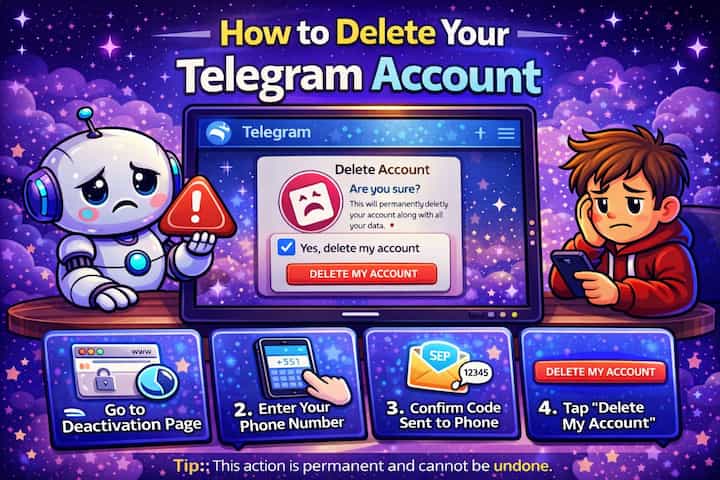
Go to Telegram's official deactivation page in a browser, enter your phone number, verify the code sent to your account, and confirm deletion. Your account and all associated data are permanently erased with no recovery option.
What This Guide Actually Helps You Do
This guide is designed for readers who want to understand what account deletion removes before you make an irreversible decision. It adds value beyond the basic menu path by explaining which data disappears, which groups or servers are affected, which backups remain separate, and whether deactivation or privacy changes would be safer. That matters because people often delete too quickly and only later realize that usernames, history, ownership, contacts, or backups cannot be restored the way they expected.
The practical goal is to leave you with a result you can verify, not just a menu path you followed. It also keeps the limits visible: this guide does not pretend to offer recovering an account after the deletion window or removing copies that other users already saved. It shows the reliable path, the trade-offs, and the checks that help you avoid repeating the same mistake.
Real Situations Where Deleting Actually Makes Sense
Most people don't delete Telegram randomly. It usually comes from a specific situation or frustration.
You want to remove your digital footprint completely. Deleting your account is the only way to fully remove your identity from Telegram. Logging out or uninstalling the app doesn't remove your data - deletion does.
You're overwhelmed by groups, notifications, or constant messages. Some users reach a point where muting chats isn't enough. Deleting the account feels like a clean break, especially if Telegram has become a primary communication tool.
You're switching platforms or changing your phone number permanently. If you no longer want your Telegram identity tied to your current number, deleting the account ensures it's no longer reachable or searchable.
Before You Start: The Part Most People Don't Fully Understand
Deleting your Telegram account removes your identity, not just your access. Once deleted, your account no longer exists. Even if you sign up again with the same number, Telegram treats it as a completely new user with no history, no contacts, and no recovery.
How to Delete Your Telegram Account - Step by Step
Step 1 - Go to the Telegram Deactivation Page
Telegram does not allow account deletion directly inside the app. You must use a web browser and access the official deactivation page.
Step 2 - Enter Your Phone Number
Enter your phone number using the international format. It must match the number currently linked to your account.
Step 3 - Receive the Confirmation Code
Telegram sends a login code. In most cases, this code appears inside your Telegram app instead of being sent by SMS.
Step 4 - Enter the Code
Enter the code on the website to verify your identity.
Step 5 - Confirm Deletion
Click the delete option and confirm your choice. Telegram will ask you to confirm more than once to prevent accidental deletion.
Step 6 - Final Confirmation
After the final confirmation, your account is permanently deleted.
What Actually Happens After Deletion
From Telegram's perspective, your account is erased. Your profile disappears, your contacts no longer see you, and your access to groups and channels is removed.
However, one detail often surprises users: messages you sent in groups may remain visible, but they are no longer linked to your identity. They appear as coming from a deleted account.
Telegram removes your account data, but it does not retroactively erase every message from every shared space.
Common Problems People Run Into (And How to Actually Fix Them)
Deleting an account sounds straightforward, but real-world scenarios often create friction.
You don't receive the confirmation code Telegram often sends the code inside the app, not via SMS. If you're logged in on another device, check there first. Waiting for an SMS is a common mistake.
You lost access to your SIM card This is one of the biggest blockers. Without access to your phone number or an active Telegram session, you cannot receive the verification code. In most cases, the only solution is to recover the number through your carrier.
You entered the wrong number format Telegram requires international format. A missing country code will cause the request to fail without a clear explanation.
You deleted your account and want it back There is no recovery. Once deleted, the account is gone permanently. This is one of the most common regrets users have.
You try to create a new account immediately and get blocked Telegram temporarily limits account creation after deletion to prevent abuse. Waiting some time usually resolves this.
The Part Most Guides Don't Tell You
Deleting your account is not always the best solution for the problem you're trying to solve.
Many users delete their account because of spam, too many notifications, or privacy concerns. In most cases, these issues can be solved without deleting everything.
Telegram gives you control over who can contact you, who can add you to groups, and how visible your account is. Deleting the account removes the problem, but it also removes everything else with it.
This is why many users regret it later - not because deletion failed, but because it worked exactly as intended.
Advanced Tips Before You Delete
Export important data before deleting Telegram does not provide recovery, but you can manually save conversations, files, or media before deleting your account.
Double-check active sessions If your account is open on another device, make sure you control it before deletion to avoid confusion during the process.
Consider changing your number instead of deleting If your goal is to disconnect from a number, Telegram allows you to change it without losing your data.
Take a pause before confirming Deletion takes seconds. Recovery is impossible. Waiting even a few minutes before confirming avoids irreversible mistakes.
What Deletion Doesn't Do
Deleting your account does not erase everything everywhere instantly. Messages in groups or channels may still exist as part of the conversation history, but without your identity attached.
It also doesn't guarantee anonymity if your data was already shared externally. Deletion removes your account from Telegram, not from screenshots, exports, or third-party archives.
Frequently Asked Questions
Is deleting a Telegram account permanent? Yes. There is no recovery option once the process is completed.
Can I get my chats back after deleting? No. All chats, contacts, and media are permanently removed.
Why can't I create a new account immediately? Telegram applies temporary restrictions after deletion to prevent abuse and spam account creation.
Will people still see my messages after deletion? In group chats, yes. Messages may remain but are no longer linked to your identity.
Is uninstalling Telegram the same as deleting my account? No. Uninstalling only removes the app from your device. Your account and data remain active.
What To Verify Before You Finish
A good finish looks like this: you have exported or saved anything important and you understand what will still exist outside your account. Before moving on, do a small real-world test: review connected devices, owned communities, subscriptions, backups, and important chats before pressing the final delete button.
If you cannot delete the account or you still see old traces afterward, the most likely explanation is that there may be an ownership transfer, password, two-factor authentication, grace period, cached data, or external copy involved. In that case, use the troubleshooting or limitation section above first, because repeating the same taps usually hides the real cause.
Related Guides
Read next: Use Telegram voice chat | Backup Telegram chats | Transfer Telegram to a new phone
Final Thoughts
Deleting your Telegram account is one of the few actions that cannot be undone, and that's exactly why it should be approached carefully.
The process itself is simple, but the impact is permanent. Once your account is gone, it's gone completely.
If your goal is to reduce noise or improve privacy, there are often better options. If your goal is to leave Telegram entirely, then deletion does exactly what it promises - nothing more, nothing less.